Setup Free Cloud CDN
Enter your domain name and subdomain to configure free Cloud CDN.
Forgot Password Login
What are the basic requirements for a free Cloud CDN setup?
To set up Cloud CDN, you need to create a free account on Cloudflare.com and add your website to Cloudflare.
No special requirements are needed. Simply add your website to your free Cloudflare account, and the Cloud CDN setup process becomes quick and easy for your website. The setup usually takes around 10–15 minutes.
Your website will not be connected directly to a Cloud CDN provider. Instead, you will use Cloud CDN services through Cloudflare.
Your website will be connected to Cloudflare, and you can enable or disable the Cloud CDN service at any time by logging into your Cloudflare account.
In addition, your account and website will benefit from extra security features and protection provided by Cloudflare.
Cloud-CDN will provide you with a new DNS record.
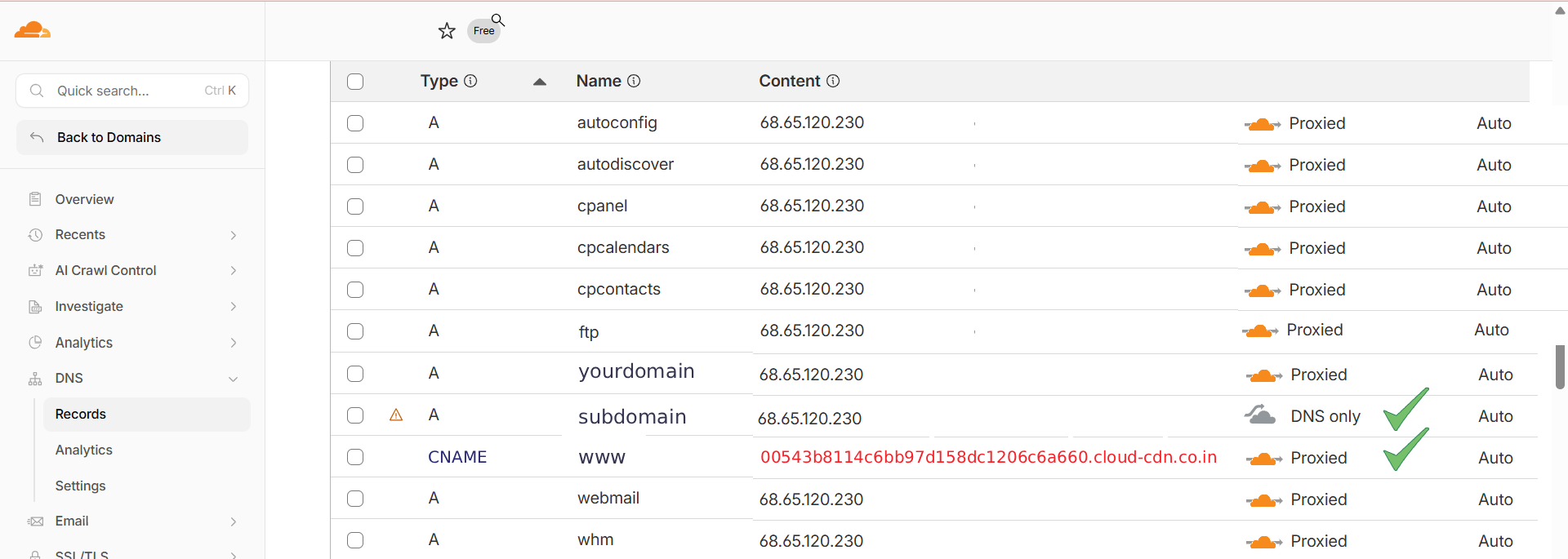
Log in to your Cloudflare account and update your DNS settings by replacing the existing IP address with the following value:
00543b8114c6bb97d158dc1206c6a660.cloud-cdn.co.in
Open the Cloudflare account where your website has been added. In the DNS settings, edit the existing CNAME record and replace the current IP address or target value with the new value provided by Cloud-CDN.
You can find more details in the official documentation.